Glyphica: Typing Survival - Free PC Download
Über Glyphica: Typing Survival
Early Access Roadmap
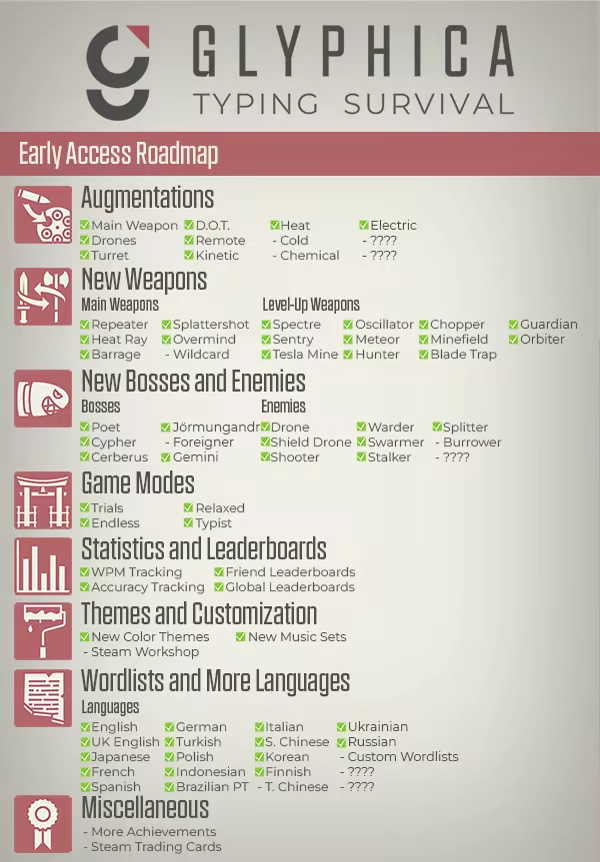
About the Game
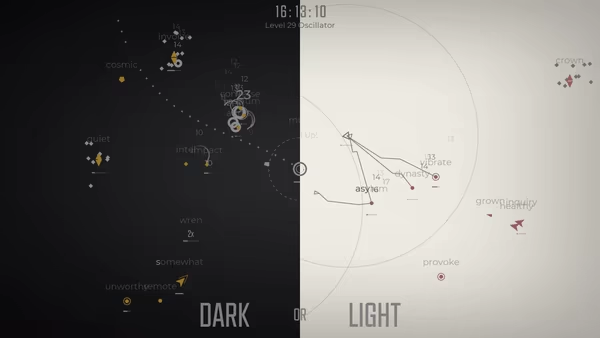
Typing meets horde survival in this fast-paced roguelite that challenges your speed, accuracy, and strategy. Step into a minimalist arena and dominate the battlefield using your typing skills and your trusty keyboard.
Not Your Ordinary Typing Test
Type the word above an enemy to finish them off. Challenge your focus and speed as bigger waves and wicked words try to slow you down and take you out.

These wily words also have a few tricks up their sleeves. Deterministic drones will simply edge closer towards you, but egregious enemies like Swarmers will fire their little bullets at you, while Shooters charge up to unleash hell on you.

Kit Out; Don’t Keysmash
Furiously fast fingers will never be enough! Upgrade your arsenal with unlockable weapons and loot that can help you make quick work of each wave of words.
Each build is uniquely yours. Set up your Oscillator and Sentry to take care of a large swathe of territory while you pick off the stragglers, or minmax your main weapon to evolve into an alphabet assassinator? The choice is yours!

(Hot)Swap your Strategies in Formidable Boss Fights
There are multiple trials for you to overcome, and a boss guarding the end of each trial. Defeating the trials unlock challenging Omens that make your enemies even more formidable. Can you out-type and outwit our orthographic overlords?

Control Freaks Rejoice!
Hate keyboards with a passion? Or are you just better with a controller? We have you covered with controller mode that works for any controller you might have, or even on the go with your Steam Deck!

Escalating Beats to Defeat Enemies to
Get into your flow state and provide your best typing performance under pressure, accompanied by pulsating techno beats to carry you to victory.

Key Features
Ever-evolving Builds: Carve your own upgrade path through hundreds of combinations.
Augmentation System: Unlock perma-upgrades and evolve your build across sessions.
Typing Speedster: The higher your WPM, the more you destroy.
Varied Arsenal: Experiment with an expansive collection of weapons, spoils, and upgrades.
Quick and Accessible: Engage in 10-20 minute runs tailored for quick sessions.
Couch mode: Words turns into quicktime sequences on controller.
Dieser Text stammt direkt von der Store-Seite des Spiels und wird automatisch übernommen. Wir schreiben und bearbeiten ihn nicht, er kann also Spoiler enthalten.
Systemanforderungen
- Min
- Windows 7/8/10
- Empf
- Windows 11
- Min
- Intel Core 5th Gen i3 or equivalent
- Empf
- Intel Core 10th Gen i5 and above or equivalent
- Min
- 4 GB RAM
- Empf
- 4 GB RAM
- Min
- Any (OpenGL 2.0 Compatible)
- Empf
- Any (OpenGL 2.0 Compatible)
- Min
- 100 MB available space
- Empf
- 100 MB available space
- Min
- Integrated
- Empf
- Integrated
- Min
- You can probably run this.
- Empf
- This game is single-core processor heavy.
Dies sind die vom Entwickler angegebenen Anforderungen, die möglicherweise nicht zu 100 % genau sind. Wenn deine Hardware unter dem Minimum liegt, probiere das Spiel trotzdem aus; viele Spiele laufen auch außerhalb der Spezifikationen gut. Im Zweifel schau dir Performance-Benchmarks auf YouTube an.
Glyphica: Typing Survival installieren
Glyphica: Typing Survival ist ein vorinstalliertes PC-Spiel, aktuell Build 24732421, 427.3 MB. Aktualisiert Aug 2026.
- Lade alle Teile von einem Mirror herunter und speichere sie im selben Ordner.
- Entpacke das erste Archiv mit 7-Zip oder WinRAR. Die übrigen Teile werden automatisch entpackt.
- Öffne den entpackten Ordner und starte die .exe des Spiels. Ein Installer ist nicht nötig.
- Vorinstalliert heißt: Nach dem Entpacken ist das Spiel spielbereit. Nichts einzurichten.
Herunterladen
Lade die Dateien von einem der untenstehenden Mirror herunter. Alle Teile werden benötigt. Speichere sie im selben Ordner und entpacke dann die erste Datei.
Wir nehmen keine Fix-Anfragen an, wenn nur ein Host ausfällt. Nutze bitte einen anderen Mirror oben. Links defekt? Sag uns Bescheid.
Wir schützen Archive nie mit Passwörtern und verstecken keine Installer. Wenn eine Seite nach einem Passwort oder einer Zahlung fragt, ist das die Werbung des Hosters, nicht wir. Siehe unseren Sicherheitsleitfaden.