
Master of Realms - Free PC Download
Über Master of Realms
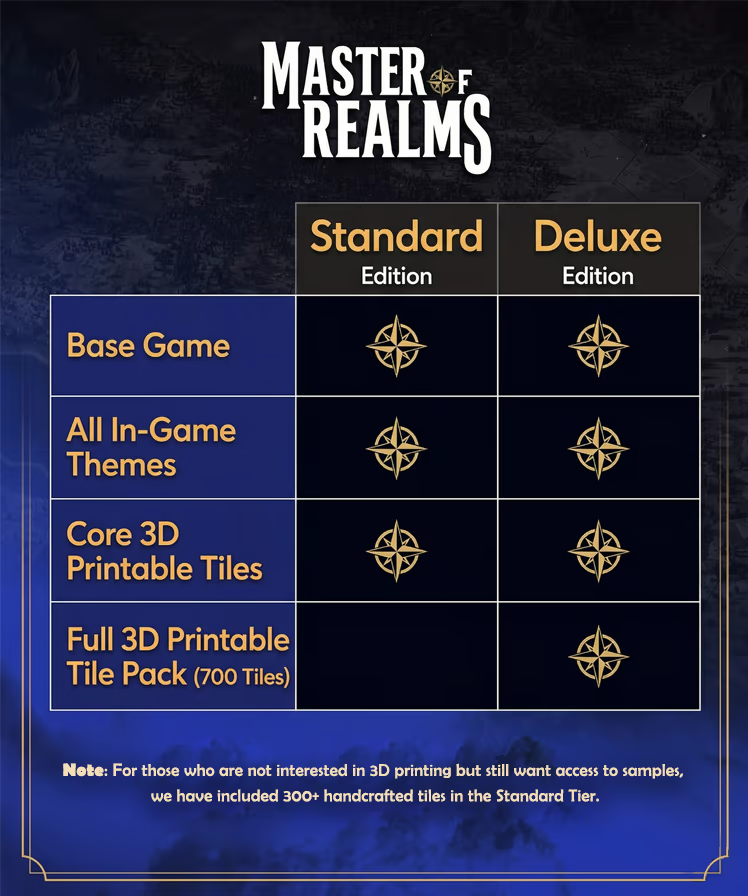
Digital Deluxe Edition
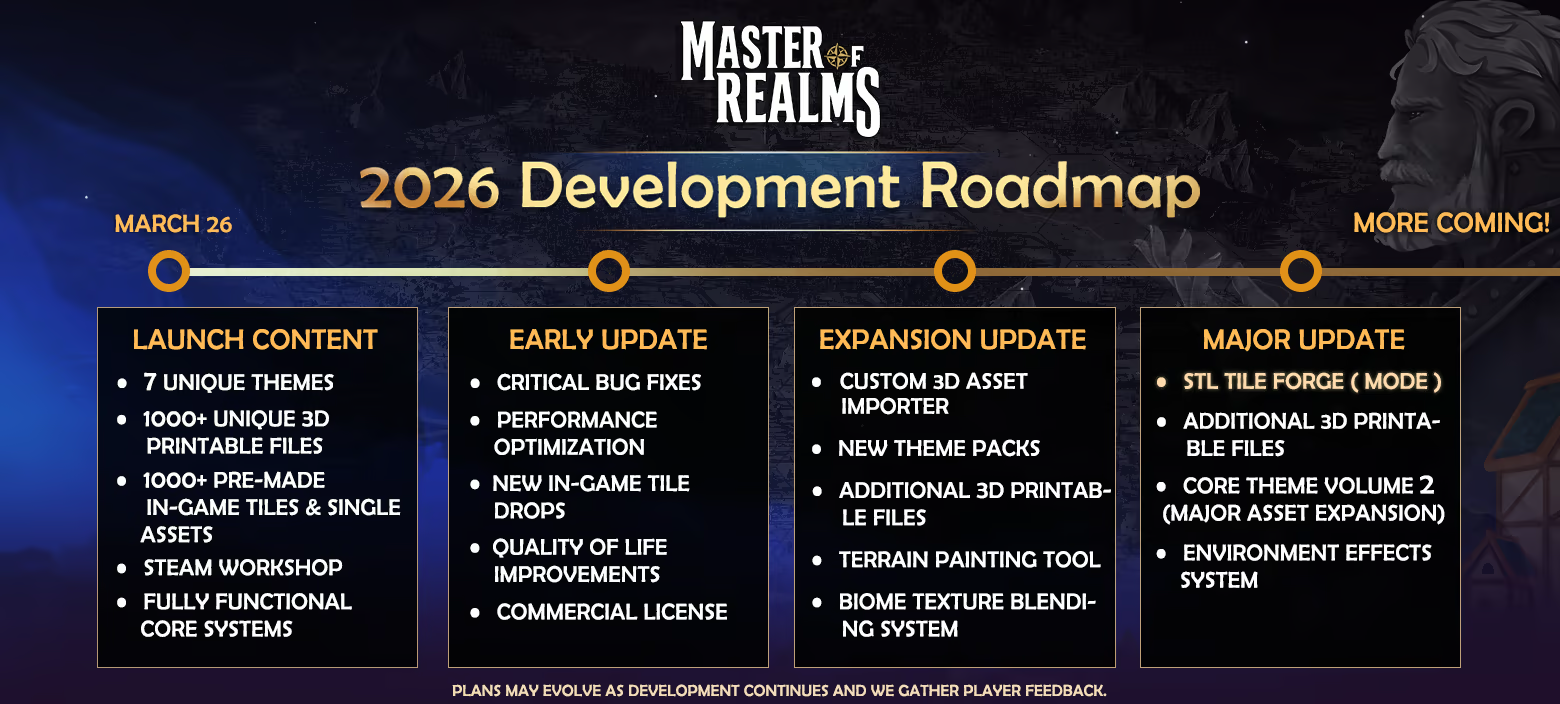
Roadmap
About the Game

Unleash your creativity with Master Of Realms, the revolutionary 3D Smart Hex Map Making Tool designed for tabletop RPG enthusiasts! Dive into immersive worldbuilding and craft world maps, regional maps, and city or town maps with ease. Master Of Realms lets you create stunning hex-based maps effortlessly, and you can bring them to life with 3D printing, 2D export for beautiful paper maps, or VTT export for your favorite online platforms.

Bring your creations to life on virtual tabletops! Export maps in 2D formats like JPG, PNG, or VTT, with full support for FoundryVTT and other platforms. Customize your grid overlay in Hex or Square style to match your campaign needs.

Go beyond the map—bring your realms to life in stunning 3D! Export fully detailed STL files for immersive gameplay, epic 3D prints, or jaw-dropping displays that showcase your world like never before.

Master of Realms gives you full flexibility to bring your imagination to life. Craft custom tiles from scratch, add objects of any shape, size, or style, and place them exactly where you want to create a world that’s truly your own.

Step into your world through your heroes’ eyes! Master of Realms introduces Character Tokens that let you explore your maps and scenes from a character’s point of view. Scale your tokens up or down to match any setting—perfect for tactical encounters or immersive storytelling. Plus, bring your characters to life in the real world with 3D-printable tokens, fully compatible with the 3D export system for STL files.
(Note: Master Of Realms is currently in active development. Features are continuously being implemented and optimized.)
Dieser Text stammt direkt von der Store-Seite des Spiels und wird automatisch übernommen. Wir schreiben und bearbeiten ihn nicht, er kann also Spoiler enthalten.
Systemanforderungen
- Min
- windows 10
- Empf
- windows 11
- Min
- Core i5 5th Generation
- Empf
- Core i5 9th Generation
- Min
- 16 GB RAM
- Empf
- 16 GB RAM
- Min
- GTX 1060
- Empf
- RTX 2060
- Min
- Version 12
- Empf
- Version 12
- Min
- 6 GB available space
- Empf
- 6 GB available space
- Min
- You can run the application smoothly on medium graphic settings.
- Empf
- You can run the application with high-quality settings for an optimal experience.
Dies sind die vom Entwickler angegebenen Anforderungen, die möglicherweise nicht zu 100 % genau sind. Wenn deine Hardware unter dem Minimum liegt, probiere das Spiel trotzdem aus; viele Spiele laufen auch außerhalb der Spezifikationen gut. Im Zweifel schau dir Performance-Benchmarks auf YouTube an.
Master of Realms installieren
Master of Realms ist ein vorinstalliertes PC-Spiel, aktuell Build 24458059, 30.9 GB. Aktualisiert Aug 2026.
- Lade alle Teile von einem Mirror herunter und speichere sie im selben Ordner.
- Entpacke das erste Archiv mit 7-Zip oder WinRAR. Die übrigen Teile werden automatisch entpackt.
- Öffne den entpackten Ordner und starte die .exe des Spiels. Ein Installer ist nicht nötig.
- Vorinstalliert heißt: Nach dem Entpacken ist das Spiel spielbereit. Nichts einzurichten.
Herunterladen
Lade die Dateien von einem der untenstehenden Mirror herunter. Alle Teile werden benötigt. Speichere sie im selben Ordner und entpacke dann die erste Datei.
Lade jeden Teil herunter. Du brauchst alle.
Wir nehmen keine Fix-Anfragen an, wenn nur ein Host ausfällt. Nutze bitte einen anderen Mirror oben. Links defekt? Sag uns Bescheid.
Wir schützen Archive nie mit Passwörtern und verstecken keine Installer. Wenn eine Seite nach einem Passwort oder einer Zahlung fragt, ist das die Werbung des Hosters, nicht wir. Siehe unseren Sicherheitsleitfaden.