

Mini Cozy Room: Lo-Fi - Free PC Download
Über Mini Cozy Room: Lo-Fi

『Mini Cozy Room : Lo-Fi』is a productivity game that blends calming Lo-Fi music with creative room decoration.
Cute avatars and pets, along with convenient desktop tools like memos, to-do lists, and a Pomodoro timer, are designed to boost your focus and efficiency.
1. Your Own Cozy Workspace
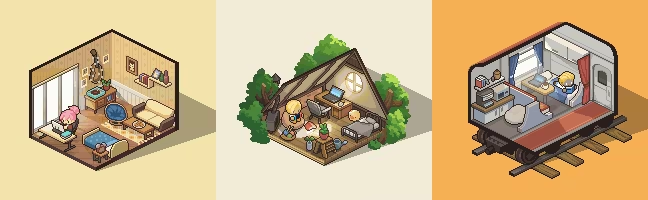
Create the workspace you’ve always dreamed of!
Choose from a wide variety of rooms, furniture, and decorations.
The beautiful workspace you design will help enhance your concentration and productivity.
2. Soothing Lo-Fi Music & Ambience
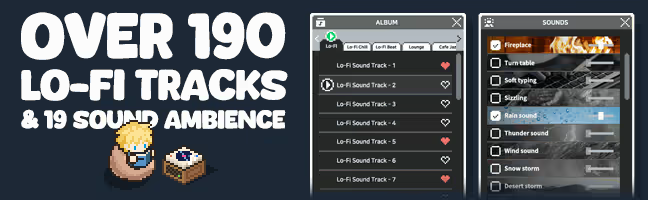
Fill your workspace with diverse Lo-Fi music genres and calming ambient sounds.
You'll soon find yourself relaxed and deeply immersed in your tasks.
3. Multiplayer Mode
Feeling lonely while working alone?
Work together with your friends!
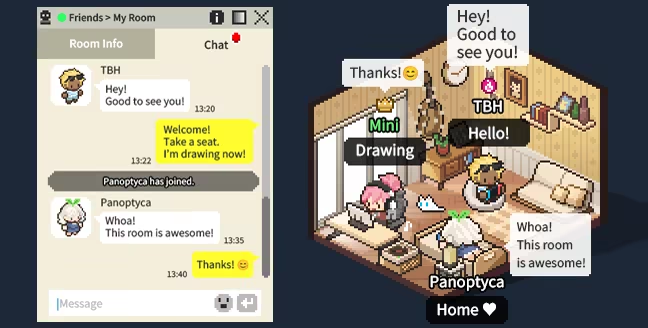
Invite friends to your workspace, or visit rooms shared by other players.
Chat freely with people from around the world using text, emojis, and mini notes.
For those who prefer a quieter environment, a Focus Mode is also available.
4. Innovative Desktop UI and Mini Mode
Freely reposition and resize notes and to-do lists on your desktop.
Feeling overwhelmed by the large game screen?
Switch to Mini Mode and conveniently place it in your taskbar!

5. Cute Avatars and Pets
Express your unique style with diverse fashion options, hairstyles, and accessories.
Move adorable avatars to chairs, beds, or beanbags and assign tasks.
Lovely pets like cats, dogs, and hedgehogs will keep you company.
6. Key Features
Enjoy Lo-Fi music across various genres
Mix different ambient sounds to create your perfect atmosphere
Use productivity tools such as Memo, To-Do List, and Pomodoro Timer (with both count-up and count-down modes)
Customize your own avatar with various hairstyles and outfits
Design your personal workspace with different wallpapers and furniture
Add external music files (MP3, WAV, etc.) to create your own playlist
Bookmark your favorite channels using the YouTube embedded player for easy access
Earn experience by listening to music. As you level up, gift deliveries arrive in your room
Level up to unlock new items and content
Dieser Text stammt direkt von der Store-Seite des Spiels und wird automatisch übernommen. Wir schreiben und bearbeiten ihn nicht, er kann also Spoiler enthalten.
Systemanforderungen
- Min
- Windows 10 (64-bit)
- Min
- Intel Core i3-2100 / AMD FX-6300
- Min
- 4 GB RAM
- Min
- NVIDIA GTX 650 / AMD Radeon HD 7750 (DirectX 11 compatible)
- Min
- Version 11
- Min
- 2 GB available space
Dies sind die vom Entwickler angegebenen Anforderungen, die möglicherweise nicht zu 100 % genau sind. Wenn deine Hardware unter dem Minimum liegt, probiere das Spiel trotzdem aus; viele Spiele laufen auch außerhalb der Spezifikationen gut. Im Zweifel schau dir Performance-Benchmarks auf YouTube an.
Mini Cozy Room: Lo-Fi installieren
Mini Cozy Room: Lo-Fi ist ein vorinstalliertes PC-Spiel, aktuell Build 24727575, 2.4GB. Aktualisiert Oct 2026.
- Lade alle Teile von einem Mirror herunter und speichere sie im selben Ordner.
- Entpacke das erste Archiv mit 7-Zip oder WinRAR. Die übrigen Teile werden automatisch entpackt.
- Öffne den entpackten Ordner und starte die .exe des Spiels. Ein Installer ist nicht nötig.
- Vorinstalliert heißt: Nach dem Entpacken ist das Spiel spielbereit. Nichts einzurichten.
Herunterladen
Lade die Dateien von einem der untenstehenden Mirror herunter. Alle Teile werden benötigt. Speichere sie im selben Ordner und entpacke dann die erste Datei.
Wir nehmen keine Fix-Anfragen an, wenn nur ein Host ausfällt. Nutze bitte einen anderen Mirror oben. Links defekt? Sag uns Bescheid.
Wir schützen Archive nie mit Passwörtern und verstecken keine Installer. Wenn eine Seite nach einem Passwort oder einer Zahlung fragt, ist das die Werbung des Hosters, nicht wir. Siehe unseren Sicherheitsleitfaden.