PHOTON CUBE - Free PC Download
Über PHOTON CUBE
* What is PHOTON CUBE?
PHOTON CUBE is a unique puzzle game which utilizes the properties of light.Control the Rookie Cube Trailer "Ray", interact with bands of light and various blocks to connect your way to the exit!
All that is needed to clear the 50+ stages, is a little bit of [knowledge about light] and your [endless imagination].
In contrast to the game's cute appearance, we have for you an Action Puzzle Game with a hearty serving of challenge!
Welcome to the intelligent and magnificent world of PHOTON CUBE!
* Game Rules
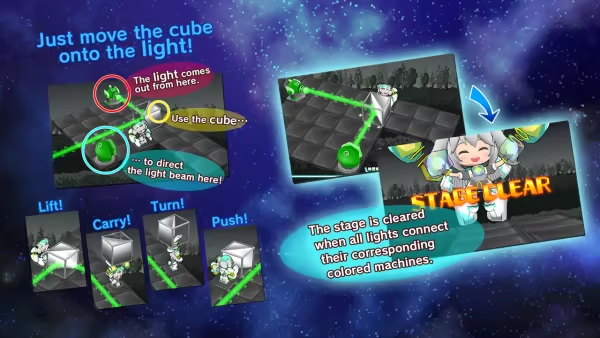
Control Ray and solve the light puzzles.To clear a stage, hit all the Light Condensers on a stage with the correct colored photons, using the Red, Green and Blue Injection Machines!
If photons hit Ray directly, you'll lose the stage, so positioning is very important!
* Combining Light
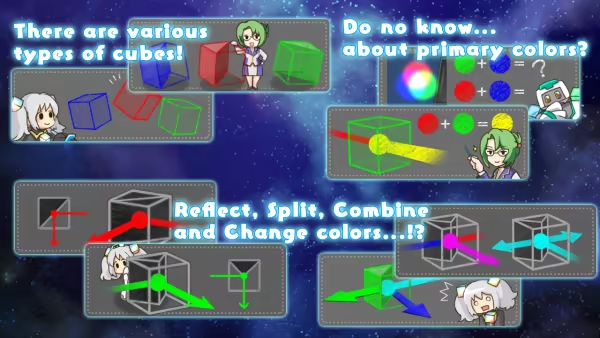
There are 7 colors of photons in the game.RED (R), GREEN (G), BLUE (B), CYAN (C), MAGENTA (M), YELLOW (Y) and WHITE (W).
Following the laws of light, the primary color released from Injector Machines will combine. As the colors mix, the light energy will increase and the color will grow brighter. When all 3 colors; Red, Green and Blue are combined they become WHITE!
* Cube Types
There are many different types of cubes throughout the various stages.From mirror cubes which reflect light, to cubes which mix it and split it, or even cubes which cannot be lifted...
Utilize the properties of each stage's cubes and pave a path of light to victory!
* How to proceed through the Planets
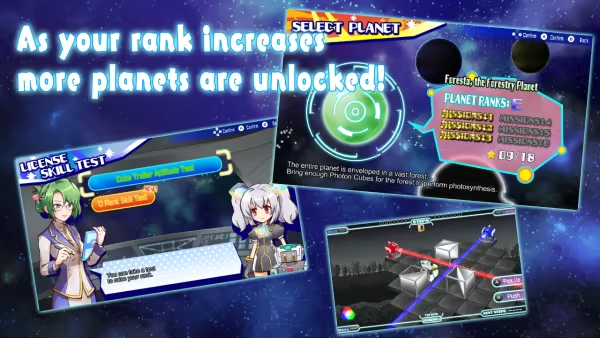
By clearing at least 3 missions on a planet, you can take a License Skill Test to proceed to the next planet.- However, depending on the planet, you may need to clear all missions.
By clearing the License Skill Test, you will become capable for proceeding to the next planet.
Upon clearing the final planet, you step up to the challenge of the "Master Trailer Mission"!
By all means, check out this ultra hard light puzzle!
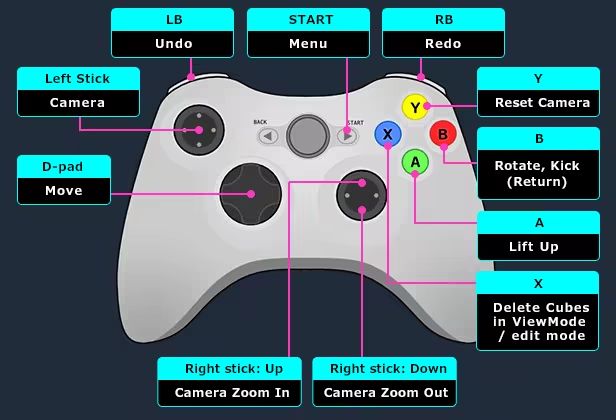
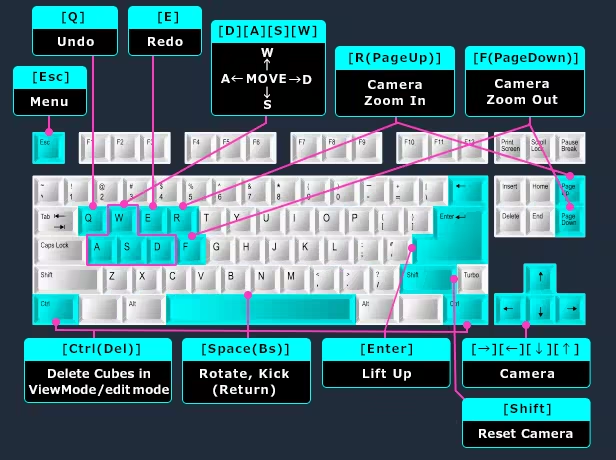
* Controls
Dieser Text stammt direkt von der Store-Seite des Spiels und wird automatisch übernommen. Wir schreiben und bearbeiten ihn nicht, er kann also Spoiler enthalten.
Systemanforderungen
- Min
- Windows 7 (SP1+), 8, 10 (64bit edition only)
- Min
- SSE2 Extension Command Set Compatible
- Min
- Graphics card with DX10 (shader model 4.0) capabilities.
Dies sind die vom Entwickler angegebenen Anforderungen, die möglicherweise nicht zu 100 % genau sind. Wenn deine Hardware unter dem Minimum liegt, probiere das Spiel trotzdem aus; viele Spiele laufen auch außerhalb der Spezifikationen gut. Im Zweifel schau dir Performance-Benchmarks auf YouTube an.
PHOTON CUBE installieren
PHOTON CUBE ist ein vorinstalliertes PC-Spiel, aktuell Build 20333209, 361.8 MB. Aktualisiert Aug 2026.
- Lade alle Teile von einem Mirror herunter und speichere sie im selben Ordner.
- Entpacke das erste Archiv mit 7-Zip oder WinRAR. Die übrigen Teile werden automatisch entpackt.
- Öffne den entpackten Ordner und starte die .exe des Spiels. Ein Installer ist nicht nötig.
- Vorinstalliert heißt: Nach dem Entpacken ist das Spiel spielbereit. Nichts einzurichten.
Herunterladen
Lade die Dateien von einem der untenstehenden Mirror herunter. Alle Teile werden benötigt. Speichere sie im selben Ordner und entpacke dann die erste Datei.
Pixeldrain drosselt kostenlose Downloads auf wenige MB/s. Die Schaltfläche Schnellen Link kopieren liefert einen Bypass-Link ohne Tempolimit. Füge ihn in deinen Downloadmanager oder in die Adressleiste deines Browsers ein.
Wir nehmen keine Fix-Anfragen an, wenn nur ein Host ausfällt. Nutze bitte einen anderen Mirror oben. Links defekt? Sag uns Bescheid.
Wir schützen Archive nie mit Passwörtern und verstecken keine Installer. Wenn eine Seite nach einem Passwort oder einer Zahlung fragt, ist das die Werbung des Hosters, nicht wir. Siehe unseren Sicherheitsleitfaden.