
The Last Craftsman - Free PC Download
Über The Last Craftsman
The Last Craftsman is a farming simulator, but with some interesting twists thrown in. You're no mere farmer, you're a Craftsman! Harvest lumber to build a chair, or catch fish to... also craft a chair. Crafting is the name of the game, what you choose to craft WITH is up to you!

You are a new graduate of the Craftsman's Guild, an organization devoted to ensuring the mechanical prosperity of every town and city in the country. Craftsmen are tasked with repairing machinery, supplying furniture, and generally maintaining the infrastructure of small towns and large cities alike by fulfilling the requests of its citizens.
You've been assigned to Gear Springs, a quaint little village out in the mountains. Normally, this would be a very exciting moment in your life, but you're unsure of how to feel. Gear Springs seems like a nice place, but rumor has it that something terrible happened in the town and the last Craftsman disappeared.
Oh well, it's too late to change your mind now! The train is already charging towards your new home.
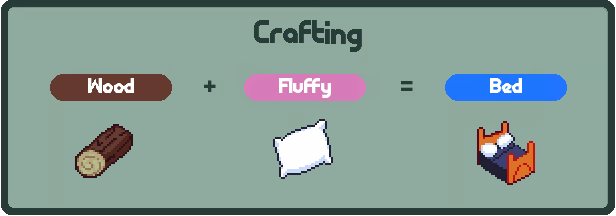
Crafting By Components
In The Last Craftsman, each item is more than the sum of its parts. It's also its parts! Every item has tags that define what it is, Lumber is Wood and Fuel, Pillows are very Fluffy, a Cactus is Spiky. These component parts are what really matter in Gear Springs. Some materials will only be available at certain times, which means the way you craft items and progress will be constantly changing!

Omni-tool Mods
As an official Craftsman, you have access to the amazing Omni-tool! The Omni-tool is great on its own and everything, but you can also install modifications to add unique effects. Some mods do simple things like make harvesting materials faster, while others can give you a chance to acquire unique materials or help you learn new crafting recipes. Some modifications even come with upgraded versions for even stronger effects!

Craft items with an open ended crafting system
Maintain your workshop property by clearing trees, rocks, and weeds
Build machines to refine materials and automate tasks
Grow plants
Go fishing
Delve into the mysterious ruins and battle robots with Punch Cards
Make friends with 25 villagers, each with unique stories (You can't get married yet... I'm sorry I thought I had time)
Customize your abilities with tool modifications
Discover the secrets of Gear Springs
Over 600 items to collect!

Dieser Text stammt direkt von der Store-Seite des Spiels und wird automatisch übernommen. Wir schreiben und bearbeiten ihn nicht, er kann also Spoiler enthalten.
Systemanforderungen
- Min
- Windows 10 Home Edition
- Min
- Intel Core i3-12100
- Min
- 8 GB RAM
- Min
- nVidia GTX 970
- Min
- Version 10
- Min
- 100 MB available space
Dies sind die vom Entwickler angegebenen Anforderungen, die möglicherweise nicht zu 100 % genau sind. Wenn deine Hardware unter dem Minimum liegt, probiere das Spiel trotzdem aus; viele Spiele laufen auch außerhalb der Spezifikationen gut. Im Zweifel schau dir Performance-Benchmarks auf YouTube an.
The Last Craftsman installieren
The Last Craftsman ist ein vorinstalliertes PC-Spiel, aktuell (13.04.2026 | Build 22756838), 133.6 MB. Aktualisiert Jun 2026.
- Lade alle Teile von einem Mirror herunter und speichere sie im selben Ordner.
- Entpacke das erste Archiv mit 7-Zip oder WinRAR. Die übrigen Teile werden automatisch entpackt.
- Öffne den entpackten Ordner und starte die .exe des Spiels. Ein Installer ist nicht nötig.
- Vorinstalliert heißt: Nach dem Entpacken ist das Spiel spielbereit. Nichts einzurichten.
Herunterladen
Lade die Dateien von einem der untenstehenden Mirror herunter. Alle Teile werden benötigt. Speichere sie im selben Ordner und entpacke dann die erste Datei.
Wir nehmen keine Fix-Anfragen an, wenn nur ein Host ausfällt. Nutze bitte einen anderen Mirror oben. Links defekt? Sag uns Bescheid.
Wir schützen Archive nie mit Passwörtern und verstecken keine Installer. Wenn eine Seite nach einem Passwort oder einer Zahlung fragt, ist das die Werbung des Hosters, nicht wir. Siehe unseren Sicherheitsleitfaden.