Word Play - Free PC Download
Über Word Play
Word Play is a brain-busting spelling game about making words, getting perks, and scoring big.
Imagine your favourite word game - but where you get to change the rules and the tiles as you play!
How to Play
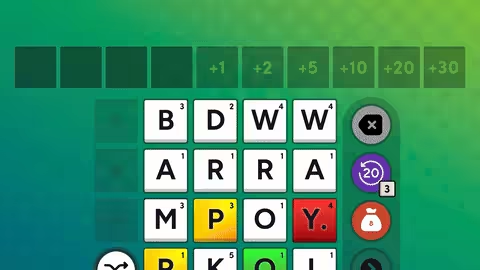
Spelling
Click, drag, or type to spell the best and biggest words you can find.
Scoring
Score points based on the value of each letter, and the length of the word.
Perks
Score enough points to clear the round and you'll get a chance to pick from more than 150 perks!
Playing with Perks
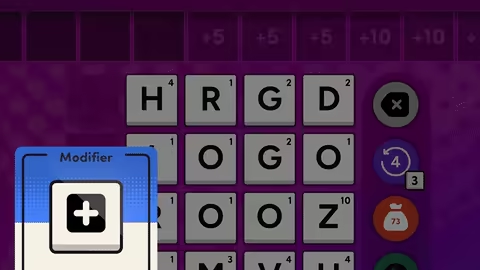
Modifiers
Modifiers change the rules of the game, in your favour. Add more tile spaces, build Bonus Points, make Q tiles become QU tiles, and more.
Upgrades
Upgrades let you improve, destroy, discard, or duplicate tiles.
Gifts
Gifts add new tiles to your letter bag. Like wildcards, mirror tiles, and the legendary + tile.
Special Tiles
Upgrade tiles to special forms like Golden, Diamond, Emerald, and Potion, to score more points.
Score Big!
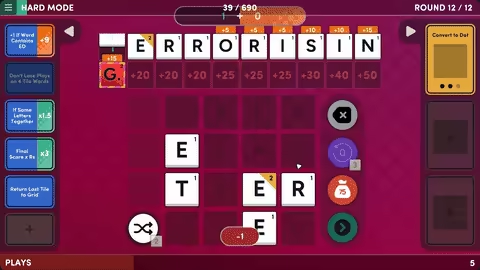
Synergies and Strategies
Combine modifiers, upgrades, gifts, and special tiles in clever ways to score big!
Difficulty and Modes
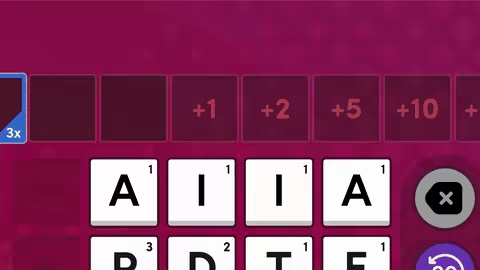
Special Rounds
Watch out for devious Special Rounds that require perfect play.
Roguelike Structure
Can you reach the end of the game without running out of "Plays"? Or will you have to start again from scratch?
Difficulty Settings
Learn the ropes with Easy mode, then try Normal, Hard, Legendary, and Marathon modes.
Casual Mode
Play with fewer strategic elements in Quick Play - just spell words and try to win medals!
Other Features
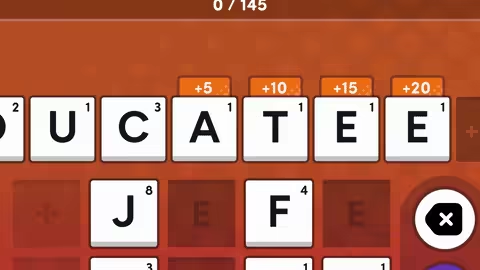
Accessibility Features
Play with mouse, keyboard, or controller. Use dyslexic fonts and / or high contrast mode. Get spelling suggestions. And more.
Steam Achievements and Steam Cloud
Unlock more than 20 achievements. Sync your save games across devices using Steam Cloud.
Steam Deck Verified
Play with gamepad controls, or fluid touchscreen input. Graphics and options are tweaked and tuned for the Steam Deck.
Custom Dictionaries
Use experimental modding features to import custom dictionaries in different languages. (Note: in-game text will remain in English. Game is only balanced for English words).
Dieser Text stammt direkt von der Store-Seite des Spiels und wird automatisch übernommen. Wir schreiben und bearbeiten ihn nicht, er kann also Spoiler enthalten.
Systemanforderungen
- Min
- Windows 7+
- Min
- Intel i5+
- Min
- 4 GB RAM
- Min
- Nvidia 450 GTS / Radeon HD 5750
- Min
- 700 MB available space
Dies sind die vom Entwickler angegebenen Anforderungen, die möglicherweise nicht zu 100 % genau sind. Wenn deine Hardware unter dem Minimum liegt, probiere das Spiel trotzdem aus; viele Spiele laufen auch außerhalb der Spezifikationen gut. Im Zweifel schau dir Performance-Benchmarks auf YouTube an.
Word Play installieren
Word Play ist ein vorinstalliertes PC-Spiel, aktuell (v19.08.2025 | Build 19649756), 567.7 MB. Aktualisiert Mar 2026.
- Lade alle Teile von einem Mirror herunter und speichere sie im selben Ordner.
- Entpacke das erste Archiv mit 7-Zip oder WinRAR. Die übrigen Teile werden automatisch entpackt.
- Öffne den entpackten Ordner und starte die .exe des Spiels. Ein Installer ist nicht nötig.
- Vorinstalliert heißt: Nach dem Entpacken ist das Spiel spielbereit. Nichts einzurichten.
Herunterladen
Lade die Dateien von einem der untenstehenden Mirror herunter. Alle Teile werden benötigt. Speichere sie im selben Ordner und entpacke dann die erste Datei.
Pixeldrain drosselt kostenlose Downloads auf wenige MB/s. Die Schaltfläche Schnellen Link kopieren liefert einen Bypass-Link ohne Tempolimit. Füge ihn in deinen Downloadmanager oder in die Adressleiste deines Browsers ein.
Wir nehmen keine Fix-Anfragen an, wenn nur ein Host ausfällt. Nutze bitte einen anderen Mirror oben. Links defekt? Sag uns Bescheid.
Wir schützen Archive nie mit Passwörtern und verstecken keine Installer. Wenn eine Seite nach einem Passwort oder einer Zahlung fragt, ist das die Werbung des Hosters, nicht wir. Siehe unseren Sicherheitsleitfaden.