Dorfromantik - Free PC Download
Sobre Dorfromantik

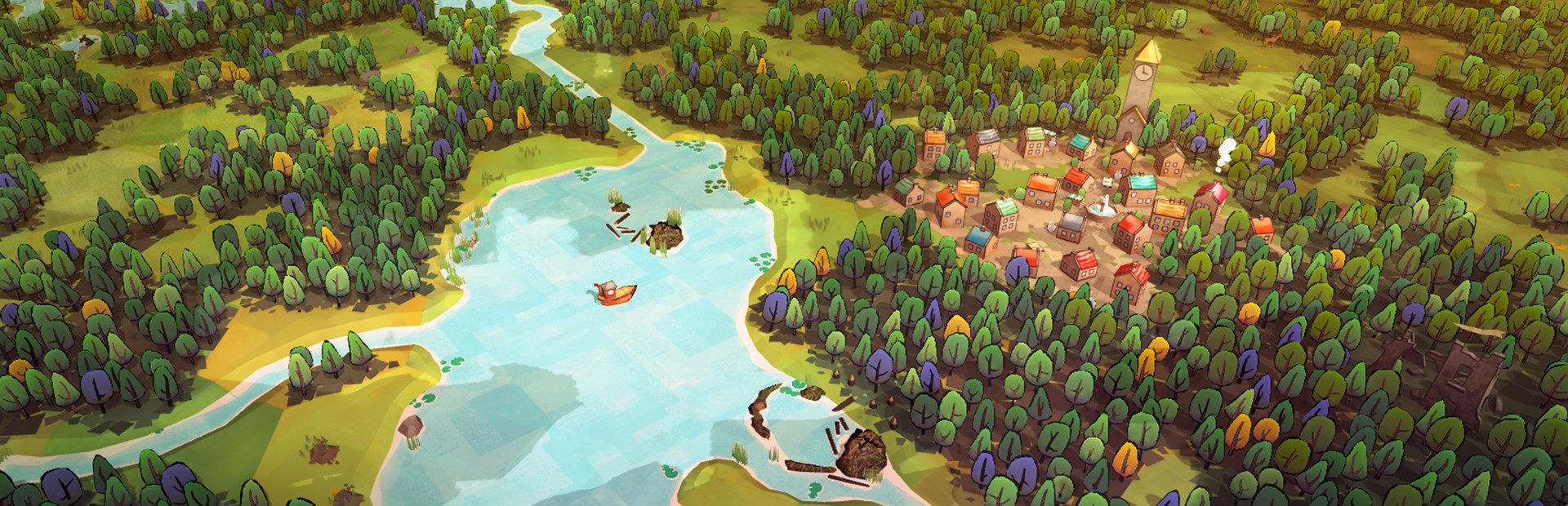
In Dorfromantik you start with a stack of procedurally generated tiles. One after the other, you draw the top tile of the stack, place it on one available slot and rotate for the best fit. Thereby groups and combinations of landscapes are formed, such as forests, villages or water bodies, and you are rewarded with points depending on how well the tile fits.

On some tiles you will also encounter special objects that give you a quest: For example, the windmill wants to border 6 grain fields, the locomotive wants to be connected to 10 tracks or the deer wants to inhabit a forest with at least 50 trees. Fulfill these quests to get more tiles to continue the expansion of your landscape. The game ends when the tile stack is used up.
As you expand the landscape, you can advance into new, colorful biomes and discover pre-placed game objects that give you long-term tasks. Through these tasks you can unlock new tiles, new biomes and new quests.


What Dorfromantik offers
- Building endless and beautiful landscapes
- Unique mix of strategy and puzzle mechanics
- Relaxing and calming gameplay
- Idyllic village scenery
- Strategic placement to beat the highscore
- High replay value - every session is different
- Many unlockable tiles and biomes
- Original Artstyle with handpainted boardgame feel
What Dorfromantik does not offer
- 4X Strategy
- Trading
- Resource Management
- Combat & Violence
- Multiplayer

Dorfromantik offers options for any style of play! Take a short break from life in quick mode or try to master the game in hard mode. The Custom Mode allows you to create your own rulesets and share them with others, while monthly mode awaits you with a new challenge every month. If you just want to relax and build your own landscape with no limits, try the creative mode!


Dorfromantik was developed by four game design students from Berlin. Together we have founded Toukana Interactive and want to develop many more small, original and high-quality indie games in the future.
We are happy about constructive feedback of all kinds, so feel free to contact us! We will do our best to respond to messages quickly and fix any problems that may arise. :)
Este texto vem direto da página do jogo na loja e é puxado automaticamente. Não somos nós que o escrevemos ou editamos, então pode conter spoilers.
Requisitos do sistema
- Mín
- Windows 7
- Rec
- Windows 10
- Mín
- 2 GHz Dual Core (Intel / AMD)
- Rec
- 2.5 GHz Dual Core (Intel / AMD)
- Mín
- 3 GB RAM
- Rec
- 4 GB RAM
- Mín
- Nvidia GT550M | AMD Radeon R7/HD 5650 | Intel HD 520
- Rec
- Nvidia GT740M | AMD Radeon R8 | Intel HD 630
- Mín
- 650 MB available space
- Rec
- 650 MB available space
- Mín
- use your imagination to make your own sounds :)
- Rec
- have one :)
Estes são os requisitos listados pela desenvolvedora e podem não ser 100% precisos. Se sua configuração ficar abaixo do mínimo, tente o jogo mesmo assim; muitos jogos rodam bem fora das especificações. Na dúvida, veja benchmarks de desempenho no YouTube.
Como instalar Dorfromantik
Dorfromantik é um jogo de PC pré-instalado, atualmente em Build 24036781, 1.5 GB. Atualizado em Jul 2026.
- Baixe todas as partes de um mesmo mirror e salve na mesma pasta.
- Extraia o primeiro arquivo com 7-Zip ou WinRAR. As demais partes são extraídas automaticamente.
- Abra a pasta extraída e execute o .exe do jogo. Não é preciso instalador.
- Pré-instalado significa que o jogo está pronto para jogar após extrair. Nada a configurar.
Baixar
Baixe os arquivos de qualquer mirror abaixo. Todas as partes são necessárias. Salve-as na mesma pasta e extraia a primeira.
O Pixeldrain limita downloads gratuitos a alguns MB/s. O botão Copiar link rápido gera um link de bypass sem limite de velocidade. Cole no seu gerenciador de downloads ou na barra de endereços do navegador.
Não aceitamos pedidos de correção quando só um host está fora do ar. Use outro mirror acima. Links quebrados? Avise-nos.
Nunca protegemos arquivos com senha nem escondemos instaladores. Se uma página pedir senha ou pagamento, é o anúncio do host, não nós. Veja nosso guia de segurança.