
Word Play - Free PC Download
Sobre Word Play
Word Play is a brain-busting spelling game about making words, getting perks, and scoring big.
Imagine your favourite word game - but where you get to change the rules and the tiles as you play!
How to Play
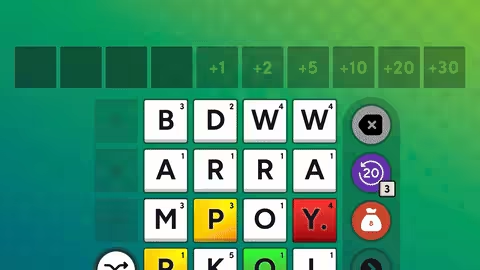
Spelling
Click, drag, or type to spell the best and biggest words you can find.
Scoring
Score points based on the value of each letter, and the length of the word.
Perks
Score enough points to clear the round and you'll get a chance to pick from more than 150 perks!
Playing with Perks
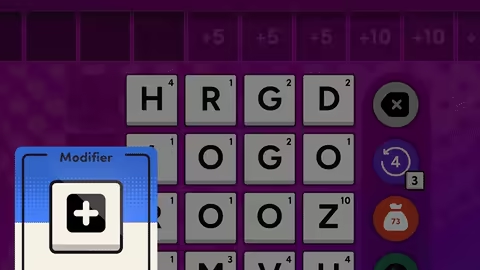
Modifiers
Modifiers change the rules of the game, in your favour. Add more tile spaces, build Bonus Points, make Q tiles become QU tiles, and more.
Upgrades
Upgrades let you improve, destroy, discard, or duplicate tiles.
Gifts
Gifts add new tiles to your letter bag. Like wildcards, mirror tiles, and the legendary + tile.
Special Tiles
Upgrade tiles to special forms like Golden, Diamond, Emerald, and Potion, to score more points.
Score Big!
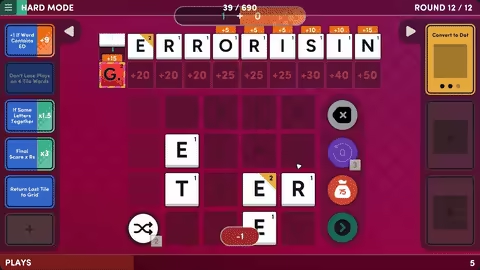
Synergies and Strategies
Combine modifiers, upgrades, gifts, and special tiles in clever ways to score big!
Difficulty and Modes
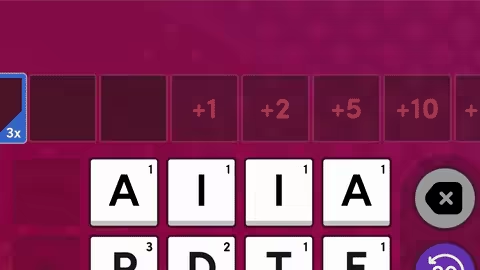
Special Rounds
Watch out for devious Special Rounds that require perfect play.
Roguelike Structure
Can you reach the end of the game without running out of "Plays"? Or will you have to start again from scratch?
Difficulty Settings
Learn the ropes with Easy mode, then try Normal, Hard, Legendary, and Marathon modes.
Casual Mode
Play with fewer strategic elements in Quick Play - just spell words and try to win medals!
Other Features
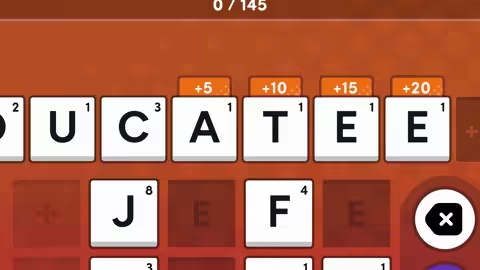
Accessibility Features
Play with mouse, keyboard, or controller. Use dyslexic fonts and / or high contrast mode. Get spelling suggestions. And more.
Steam Achievements and Steam Cloud
Unlock more than 20 achievements. Sync your save games across devices using Steam Cloud.
Steam Deck Verified
Play with gamepad controls, or fluid touchscreen input. Graphics and options are tweaked and tuned for the Steam Deck.
Custom Dictionaries
Use experimental modding features to import custom dictionaries in different languages. (Note: in-game text will remain in English. Game is only balanced for English words).
Este texto vem direto da página do jogo na loja e é puxado automaticamente. Não somos nós que o escrevemos ou editamos, então pode conter spoilers.
Requisitos do sistema
- Mín
- Windows 7+
- Mín
- Intel i5+
- Mín
- 4 GB RAM
- Mín
- Nvidia 450 GTS / Radeon HD 5750
- Mín
- 700 MB available space
Estes são os requisitos listados pela desenvolvedora e podem não ser 100% precisos. Se sua configuração ficar abaixo do mínimo, tente o jogo mesmo assim; muitos jogos rodam bem fora das especificações. Na dúvida, veja benchmarks de desempenho no YouTube.
Como instalar Word Play
Word Play é um jogo de PC pré-instalado, atualmente em (v19.08.2025 | Build 19649756), 567.7 MB. Atualizado em Mar 2026.
- Baixe todas as partes de um mesmo mirror e salve na mesma pasta.
- Extraia o primeiro arquivo com 7-Zip ou WinRAR. As demais partes são extraídas automaticamente.
- Abra a pasta extraída e execute o .exe do jogo. Não é preciso instalador.
- Pré-instalado significa que o jogo está pronto para jogar após extrair. Nada a configurar.
Baixar
Baixe os arquivos de qualquer mirror abaixo. Todas as partes são necessárias. Salve-as na mesma pasta e extraia a primeira.
O Pixeldrain limita downloads gratuitos a alguns MB/s. O botão Copiar link rápido gera um link de bypass sem limite de velocidade. Cole no seu gerenciador de downloads ou na barra de endereços do navegador.
Não aceitamos pedidos de correção quando só um host está fora do ar. Use outro mirror acima. Links quebrados? Avise-nos.
Nunca protegemos arquivos com senha nem escondemos instaladores. Se uma página pedir senha ou pagamento, é o anúncio do host, não nós. Veja nosso guia de segurança.