

Mini Cozy Room: Lo-Fi - Free PC Download
Об игре Mini Cozy Room: Lo-Fi

『Mini Cozy Room : Lo-Fi』is a productivity game that blends calming Lo-Fi music with creative room decoration.
Cute avatars and pets, along with convenient desktop tools like memos, to-do lists, and a Pomodoro timer, are designed to boost your focus and efficiency.
1. Your Own Cozy Workspace
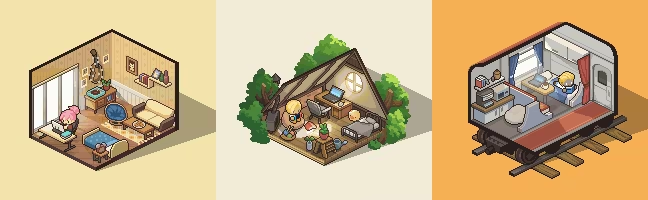
Create the workspace you’ve always dreamed of!
Choose from a wide variety of rooms, furniture, and decorations.
The beautiful workspace you design will help enhance your concentration and productivity.
2. Soothing Lo-Fi Music & Ambience
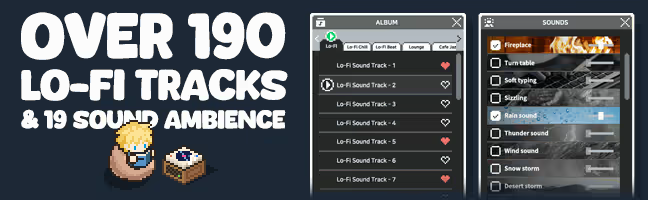
Fill your workspace with diverse Lo-Fi music genres and calming ambient sounds.
You'll soon find yourself relaxed and deeply immersed in your tasks.
3. Multiplayer Mode
Feeling lonely while working alone?
Work together with your friends!
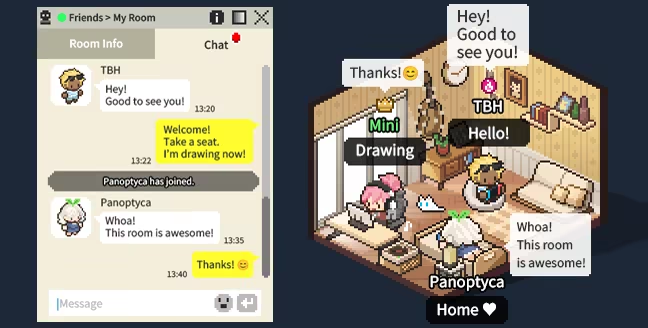
Invite friends to your workspace, or visit rooms shared by other players.
Chat freely with people from around the world using text, emojis, and mini notes.
For those who prefer a quieter environment, a Focus Mode is also available.
4. Innovative Desktop UI and Mini Mode
Freely reposition and resize notes and to-do lists on your desktop.
Feeling overwhelmed by the large game screen?
Switch to Mini Mode and conveniently place it in your taskbar!

5. Cute Avatars and Pets
Express your unique style with diverse fashion options, hairstyles, and accessories.
Move adorable avatars to chairs, beds, or beanbags and assign tasks.
Lovely pets like cats, dogs, and hedgehogs will keep you company.
6. Key Features
Enjoy Lo-Fi music across various genres
Mix different ambient sounds to create your perfect atmosphere
Use productivity tools such as Memo, To-Do List, and Pomodoro Timer (with both count-up and count-down modes)
Customize your own avatar with various hairstyles and outfits
Design your personal workspace with different wallpapers and furniture
Add external music files (MP3, WAV, etc.) to create your own playlist
Bookmark your favorite channels using the YouTube embedded player for easy access
Earn experience by listening to music. As you level up, gift deliveries arrive in your room
Level up to unlock new items and content
Этот текст берётся напрямую со страницы игры в магазине и подставляется автоматически. Мы его не пишем и не редактируем, поэтому в нём могут быть спойлеры.
Системные требования
- Мин
- Windows 10 (64-bit)
- Мин
- Intel Core i3-2100 / AMD FX-6300
- Мин
- 4 GB RAM
- Мин
- NVIDIA GTX 650 / AMD Radeon HD 7750 (DirectX 11 compatible)
- Мин
- Version 11
- Мин
- 2 GB available space
Это требования, указанные разработчиком, и они могут быть не на 100% точными. Если ваше железо ниже минимума, всё равно попробуйте игру; многие игры нормально работают и вне спецификаций. Если сомневаетесь, посмотрите тесты производительности на YouTube.
Как установить Mini Cozy Room: Lo-Fi
Mini Cozy Room: Lo-Fi — предустановленная игра для ПК, сейчас Build 24727575, 2.4GB. Обновлено Oct 2026.
- Скачайте все части с одного зеркала и сохраните в одну папку.
- Распакуйте первый архив через 7-Zip или WinRAR. Остальные части распакуются автоматически.
- Откройте папку и запустите .exe игры. Установщик не нужен.
- Предустановленная игра готова к запуску сразу после распаковки. Ничего настраивать не нужно.
Скачать
Скачайте файлы из любого зеркала ниже. Все части необходимы. Сохраните их в одну папку и распакуйте первую часть.
Мы не принимаем запросы на исправление, если не работает только один сервер. Используйте другое зеркало выше. Ссылки не работают? Сообщите нам.
Мы никогда не ставим пароли на архивы и не прячем внутри установщики. Если страница просит пароль или оплату, это реклама файлообменника, а не мы. Смотрите наше руководство по безопасности.