
STAR WARS Zero Company™ - Free PC Download
Sobre STAR WARS Zero Company™
STAR WARS Zero Company™ Deluxe Edition
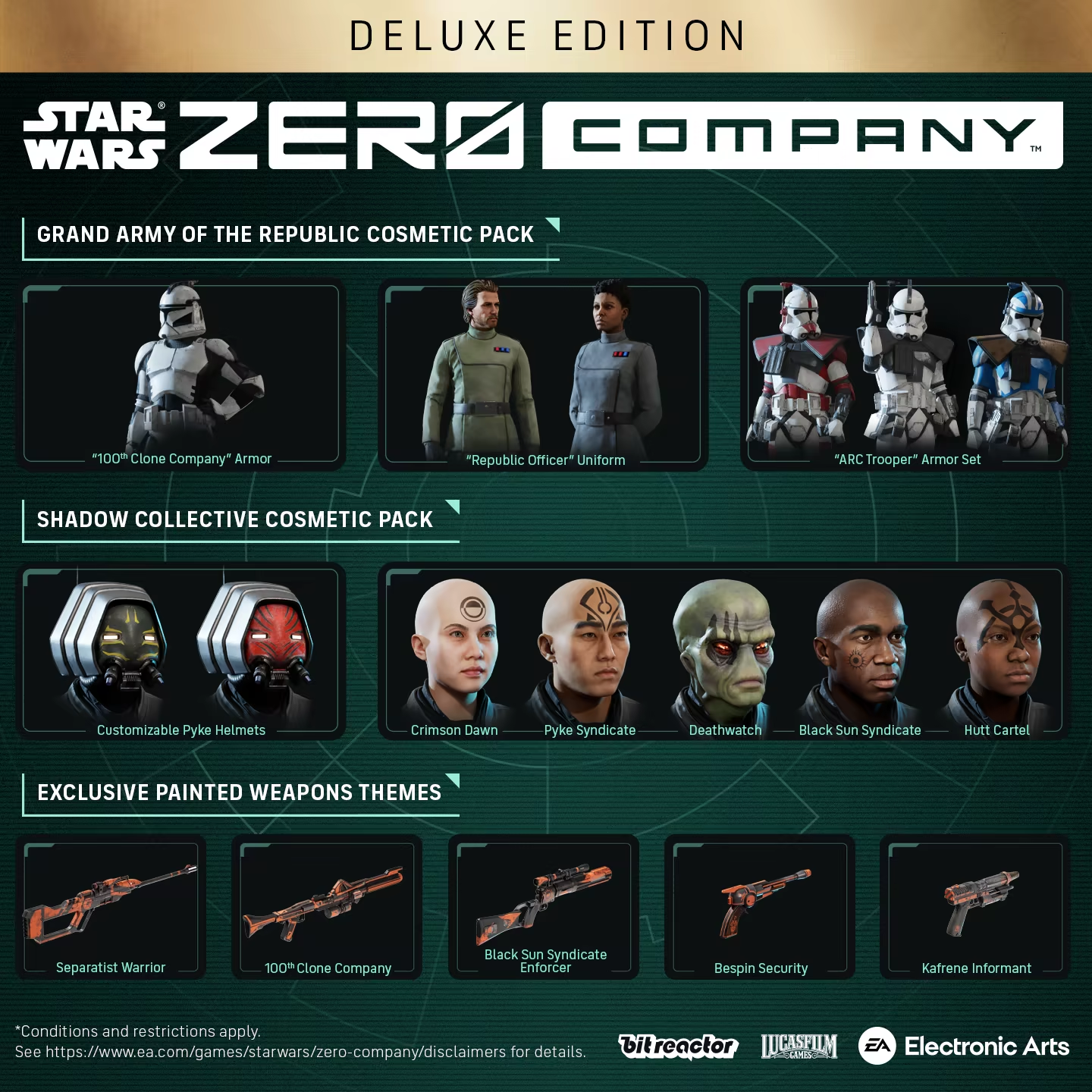
Unlock unique cosmetic items inspired by the Clone Wars™ era with STAR WARS Zero Company™ Deluxe Edition.
The “Grand Army of the Republic” Cosmetic Pack:
- “Republic Officer” Uniform
- “100th Clone Company” Armor Set
- “ARC Trooper” Armor Set
- “Pyke” Helmet Cosmetic
- 5 cosmetic tattoos: “Pyke Syndicate,” “Hutt Cartel,” “Death Watch,” “Black Sun Syndicate,” & “Crimson Dawn”
- “100th Clone Company”
- “Kafrene Informant”
- “Black Sun Syndicate Enforcer”
- “Bespin Security”
- “Separatist Warrior”
About the Game
Command an elite squad through a gritty and authentic story in STAR WARS Zero Company™, a single-player turn-based tactics game set in the twilight of the Clone Wars™.
You will step into the shoes of Hawks, a former Republic officer who leads Zero Company as they are recruited for an operation that pits them against an emerging threat that will consume the galaxy if left unchecked.

Command the galaxy’s finest in tactical operations, investigations, and other heart-pounding missions through a cinematic original story.

Strategize and adapt at both your base of operations and an ever-shifting battlefield to make every move count — the outcomes of your decisions make each playthrough different.

Deploy a team of operatives composed of a variety of archetypes — ranging from scoundrels to astromechs, or even a Jedi — choosing from an arsenal of tactical abilities to outmaneuver and defeat your foes.

Improve your squad’s skills as you deploy them on missions, where they learn to work together and unlock new combat synergies that could be the difference between victory and defeat.

Customize Hawks’ combat specialization and appearance, then fill out your team with original and custom-made Star Wars characters, tailoring their appearances, loadouts, and abilities to fit your playstyle.
Este texto vem direto da página do jogo na loja e é puxado automaticamente. Não somos nós que o escrevemos ou editamos, então pode conter spoilers.
Requisitos do sistema
- Mín
- 64 bit Windows 10/11 (Windows 11 Recommended)
- Rec
- 64 bit Windows 10/11 (Windows 11 Recommended)
- Mín
- Intel Core i5-8400 or Ryzen 5 2600X
- Rec
- Intel Core i7-10700K or Ryzen 7 3700X
- Mín
- 16 GB RAM
- Rec
- 32 GB RAM
- Mín
- Nvidia GeForce GTX 1080, Radeon RX 5600 XT, or Intel ARC B580
- Rec
- Nvidia Geforce RTX 3080 or Radeon RX 7800 XT
- Mín
- Version 12
- Rec
- Version 12
- Mín
- 50 GB available space
- Rec
- 50 GB available space
- Mín
- Resolution: 1920x1080 FPS: 30 Graphics Settings Preset: Low
- Rec
- Resolution: 2560x1440 FPS: 60 Graphics Settings Preset: High
Estes são os requisitos listados pela desenvolvedora e podem não ser 100% precisos. Se sua configuração ficar abaixo do mínimo, tente o jogo mesmo assim; muitos jogos rodam bem fora das especificações. Na dúvida, veja benchmarks de desempenho no YouTube.
Como instalar STAR WARS Zero Company™
STAR WARS Zero Company™ é um jogo de PC pré-instalado, atualmente em Build 25898267, 34.8GB. Atualizado em Oct 2026.
- Baixe todas as partes de um mesmo mirror e salve na mesma pasta.
- Extraia o primeiro arquivo com 7-Zip ou WinRAR. As demais partes são extraídas automaticamente.
- Abra a pasta extraída e execute o .exe do jogo. Não é preciso instalador.
- Pré-instalado significa que o jogo está pronto para jogar após extrair. Nada a configurar.
Baixar
Baixe os arquivos de qualquer mirror abaixo. Todas as partes são necessárias. Salve-as na mesma pasta e extraia a primeira.
Baixe todas as partes. Você precisa de todas.
Nunca protegemos arquivos com senha nem escondemos instaladores. Se uma página pedir senha ou pagamento, é o anúncio do host, não nós. Veja nosso guia de segurança.