Taiko no Tatsujin: Rhythm Festival - Free PC Download
Über Taiko no Tatsujin: Rhythm Festival
The Setlist Edition

The Setlist Edition includes:
- Taiko no Tatsujin: Rhythm Festival
- Anime Songs Collection
- Pops Collection
- Vocaloid™ Songs Collection
About the Game
Welcome to Omiko City, where everyone’s favorite Taiko elements come together in one place! Together with Don-chan, meet your new friend, Kumo-kyun and aim to become a Taiko Master!Taiko Mode
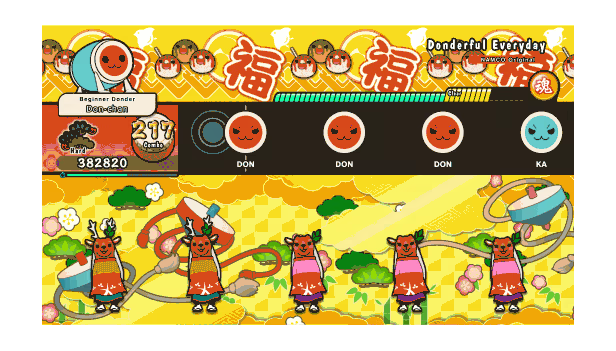
Drum along to the rhythm of your favorite songs and aim to play them from start to finish! Select from 4 difficulty modes.
76 songs across multiple genres such as Anime, VOCALOID™, Game Music, and Pop are available in the game! Songs include Gurenge, My Neighbor Totoro - Ending Theme Song, Charles, MEGALOVANIA, Into The Night, Feel Special and many more! Have fun playing casually with another player or compete for the highest score! You can also use Improvement Support to help you improve your drumming skills!
3 types of party games for 1-4 players are available.
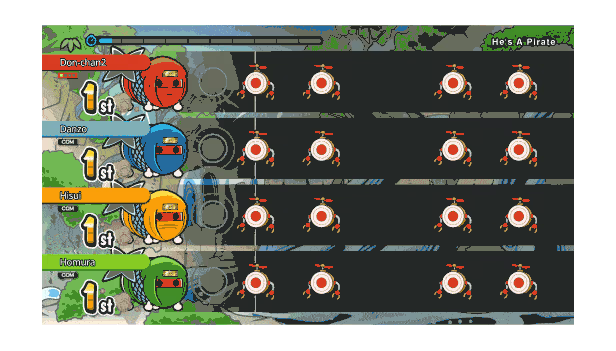
- Great Drum Toy War
Play along to songs and deploy toys to push back your opponent's toys and aim for victory!
- Don-chan Band
Work as a group of 4 to perform successful concerts!
- Run! Ninja Dojo
Become a ninja and race with up to 4 other players! Overcome multiple obstacles as you compete for 1st place!
Online Matches
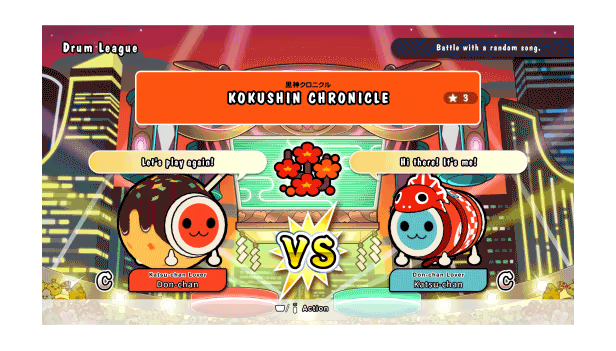
- Online Ranked Match
Challenge players from all over the world and aim for the top ranks!
- Room Match
Play casually with friends and players from around the world in Taiko Mode and Great Drum Toy War!
Have fun playing Taiko solo, or together with friends!
Taiko Music Pass
- Join the Taiko Music Pass to access over 700 additional songs! New songsare added every month!
- Some songs are also sold individually.
*Another edition of this product is available. Please take care to avoid duplicate purchases.
*Taiko Mode and Great Drum Toy War can be played by up to 2 players. Don-chan Band and Run! Ninja Dojo can be played by up to 4 players. Each player needs 1 controller.
*This game is compatible with the Taiko no Tatsujin Drum Controller for Xbox Series X|S, Windows PC.
Dieser Text stammt direkt von der Store-Seite des Spiels und wird automatisch übernommen. Wir schreiben und bearbeiten ihn nicht, er kann also Spoiler enthalten.
Systemanforderungen
- Min
- Windows 10 64bit / Windows 11 64bit
- Empf
- Windows 10 64bit / Windows 11 64bit
- Min
- Intel Core i5-750, 2.67 GHz / AMD A12-9800, 3.80 GHz
- Empf
- Intel Core i5-2300, 2.80 GHz / AMD Ryzen 3 1200, 3.10 GHz
- Min
- 8 GB RAM
- Empf
- 8 GB RAM
- Min
- NVIDIA GeForce GTX 750 Ti, 2 GB / AMD Radeon HD 7770, 2 GB / Intel Iris Plus
- Empf
- NVIDIA GeForce GTX 760 / AMD Radeon R9 270X / Intel Arc A380
- Min
- 4 GB available space
- Empf
- 4 GB available space
- Min
- Estimated performance: 1080p/60fps with graphics settings at "Low". Framerate might drop in graphics-intensive scenes. - 64-bit processor and operating system are required.
- Empf
- Estimated performance: 1080p/60fps with graphics settings at "High". Framerate might drop in graphics-intensive scenes. - 64-bit processor and operating system are required. - Windows 10 (Version 1809 or later) and a 4GB VRAM GPU (graphics board or video card) are required for DirectX 12 API.
Dies sind die vom Entwickler angegebenen Anforderungen, die möglicherweise nicht zu 100 % genau sind. Wenn deine Hardware unter dem Minimum liegt, probiere das Spiel trotzdem aus; viele Spiele laufen auch außerhalb der Spezifikationen gut. Im Zweifel schau dir Performance-Benchmarks auf YouTube an.
Taiko no Tatsujin: Rhythm Festival installieren
Taiko no Tatsujin: Rhythm Festival ist ein vorinstalliertes PC-Spiel, aktuell Build 23293963, 3.2GB. Aktualisiert Sep 2026.
- Lade alle Teile von einem Mirror herunter und speichere sie im selben Ordner.
- Entpacke das erste Archiv mit 7-Zip oder WinRAR. Die übrigen Teile werden automatisch entpackt.
- Öffne den entpackten Ordner und starte die .exe des Spiels. Ein Installer ist nicht nötig.
- Vorinstalliert heißt: Nach dem Entpacken ist das Spiel spielbereit. Nichts einzurichten.
Herunterladen
Lade die Dateien von einem der untenstehenden Mirror herunter. Alle Teile werden benötigt. Speichere sie im selben Ordner und entpacke dann die erste Datei.
Wir nehmen keine Fix-Anfragen an, wenn nur ein Host ausfällt. Nutze bitte einen anderen Mirror oben. Links defekt? Sag uns Bescheid.
Wir schützen Archive nie mit Passwörtern und verstecken keine Installer. Wenn eine Seite nach einem Passwort oder einer Zahlung fragt, ist das die Werbung des Hosters, nicht wir. Siehe unseren Sicherheitsleitfaden.