Tooth and Tail Free Download
Pocketwatch Games2017Strategy, Indie
759.0MBBuild 25258221Updated 2 days ago
About Tooth and Tail
Lead the revolution with an army of flamethrowing Boars, mustard gas-lobbing Skunks, and paratrooper-puking Owls. Tooth and Tail is a Real-Time-Strategy game featuring Single Player, Online Competitive Play, Split Screen, Replays, and more. Build a base, lead your army, eat your enemies!

Lead the revolution with an army of flamethrowing Boars, mustard gas-lobbing Skunks, and paratrooper-puking Owls. Tooth and Tail is a Real-Time-Strategy game featuring Single Player, Online Competitive Play, Split Screen, Replays, and more.
Build a base, lead your army, eat your enemies!
The War for Meat
The Longcoats, the Commonfolk, the KSR, and the Civilized are in the midst of a Civil War over who gets to eat, and who has to be the meat. A darkly humorous tale of riots and revolution is told through an extensive Single Player campaign.Endless Replayability
With procedurally generated maps and customizable factions, no two conflicts will be the same, forcing players to strategize rather than memorize.Pick-up-and-Play
With matches lasting from 5-12 minutes, controls designed specifically for the gamepad, and split-screen couch play, Tooth and Tail is a popcorn RTS for veterans and newcomers alike.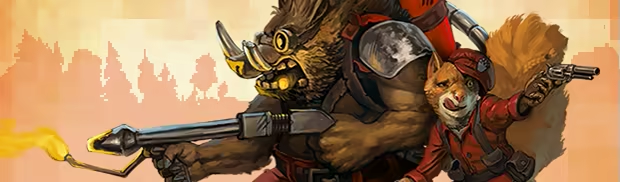
From the store page, unedited. May contain spoilers.
This release
Reviews and playtime
Very Positive
82% of 2,890
The game
Genres and features
How to install Tooth and Tail
Pre-installed, so there is no setup wizard. Follow these in order.
- 01
Create a games folder
Make a folder like C:\Games\ and keep every game in it. Avoid Program Files, Downloads and the Desktop.
- 02
Exclude it from Windows Defender
Defender often deletes cracked files by mistake while they extract. Add C:\Games\ as an excluded folder:
Windows Security -> Virus & threat protection -> Manage settings -> Exclusions -> Add an exclusion -> Folder
- 03
Download into C:\Games\
Save the archive straight into that folder. This release is one 759.0MB file.
- 04
Extract it there
Use 7-Zip or WinRAR. Keep about 1.6 GB free while it unpacks.
- One file
- Right-click it -> Extract here.
- Several parts
- Extract only part1 (or .001). The other parts are read automatically.
- 05
Open README.html
It is inside the extracted folder and explains how to start the game.
Still stuck? Read the install help
Download
Set up your games folder and the Defender exclusion before you extract. The Install tab has the steps.
FilesYard
The whole game in one file
VikingFile
The whole game in one file
We don't accept fix requests when only one host is down. Please use another mirror above. Links broken? Let us know.
We never password-protect files or hide installers. If a page asks for a password or payment, that is the host's ad, not us. See our safety guide.
System requirements
- Min
- Windows 7 or later
- Min
- 2 GHz Processor
- Min
- 2 GB RAM
- Min
- 1.5gb video card required to play. nVidia 320M, Radeon HD 2400, Intel HD 3000 or better
- Min
- Version 11
- Min
- 2 GB available space
These are the developer's listed requirements and may not be 100% accurate. If your specs fall below the minimum, try the game anyway; many games run fine below the listed requirements. When in doubt, check YouTube for performance benchmarks.